Music lives and dies by its rhythm. When different musical layers drift out of time with each other across a soundwalk, the spell is broken in an instant — the audio feels accidental rather than composed. SonicMaps’ beat synchronization keeps your soundwalks flowing seamlessly, so listeners experience every beat as part of one coherent musical journey.
What is Beat Sync?
Beat synchronization is a timing system that keeps multiple rhythmic tracks running in time with each other, using a shared tempo and bar structure instead of letting every zone run independently. Loops and beat‑based materials in different zones follow the same BPM and bar count, so when they are heard together they behave like parts of one arrangement rather than separate tracks starting at random moments.
Behind the scenes, Beat Sync uses a global Master Clock that defines the project’s BPM and beats per bar. Any zone with Beat Sync enabled aligns its playback to that clock, so entries and loops are placed on the same bar grid regardless of when the listener actually enters the zone. This lets you build soundwalks where drums, bass, pads, and other rhythmic layers can be mixed and spread across the map while still feeling like a single, coherent musical texture.
Why Beat Sync Matters
- Musical Coherence: In a location-based experience that uses music across multiple zones, off-beat starts are immediately noticeable and can make a carefully composed soundscape feel amateurish. Because all Beat Sync zones share the same Master Clock, they stay rhythmically locked to each other — much like separate instruments playing to the same click track. The result is a multi-zone arrangement that behaves like a single, spatially distributed performance.
- Deeper Immersion: Sound that arrives on the beat feels intentional. A phrase that lands on the downbeat as a visitor rounds a corner or crosses a threshold reinforces the sense that the environment itself is responding to them, deepening the emotional impact of the experience. That moment of synchrony is one of the subtlest but most powerful tools in a sound designer's toolkit.
- Creative Control: Beat Sync is configurable to your music. The Master Clock lets you dial in any tempo from 40 to 240 BPM and choose a time signature from 1 to 16 beats per bar, so whether your soundtrack is a slow ambient pulse or an up-tempo groove, the grid fits the music rather than the other way around. Combined with the full set of per-zone playback options, Beat Sync gives you the precision to choreograph audio across a landscape the way a composer choreographs sound across time.
How to use Beat Sync in SonicMaps
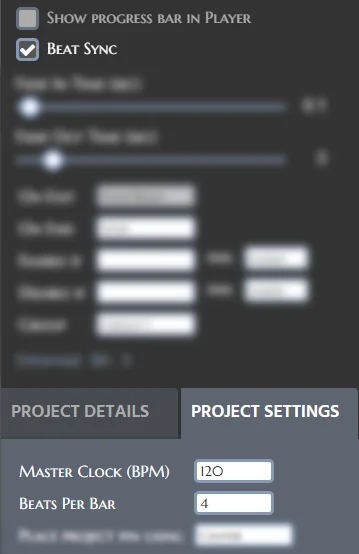
Step 1 — Set the Master Clock. Open your project in the SonicMaps Editor and go to Project Settings. Enter the tempo of your music in the Master Clock (BPM) field (any value from 40 to 240; the default is 120) and set Beats per Bar to match your time signature (1–16; the default is 4 for standard 4/4 time). These two values define the rhythmic grid that every Beat Sync zone in the project will follow.
Step 2 — Enable Beat Sync on a zone. Click a zone on the map to open its properties panel, then tick the Beat Sync checkbox. Note that Beat Sync is currently a PLUS/PRO feature. If your account is on the Basic plan, the Beat Sync option will appear disabled in the SonicMaps Editor.
Step 3 — Note the automatic adjustments. Enabling Beat Sync makes two changes to the zone's settings automatically. The On Exit behaviour is locked to Reset, which ensures that if a listener leaves and re-enters the zone, the audio always restarts from the beginning and waits for the next bar boundary rather than resuming mid-phrase. The Progress Circle option is also disabled, as it is not compatible with beat-quantised playback.
Step 4 — Save and publish. Save your project as normal. From this point on, whenever a listener enters that zone, playback will be held until the downbeat of the next bar — regardless of where in the bar the Master Clock happens to be at that moment.